Everything You Need to Know About Ollie: Frequently Asked Questions (FAQs)
Families today manage an incredible amount of invisible work — coordinating schedules, remembering details, planning meals, keeping everyone informed, and responding to the constant stream of texts, emails, and calendar changes.
Ollie was designed to help with exactly that.
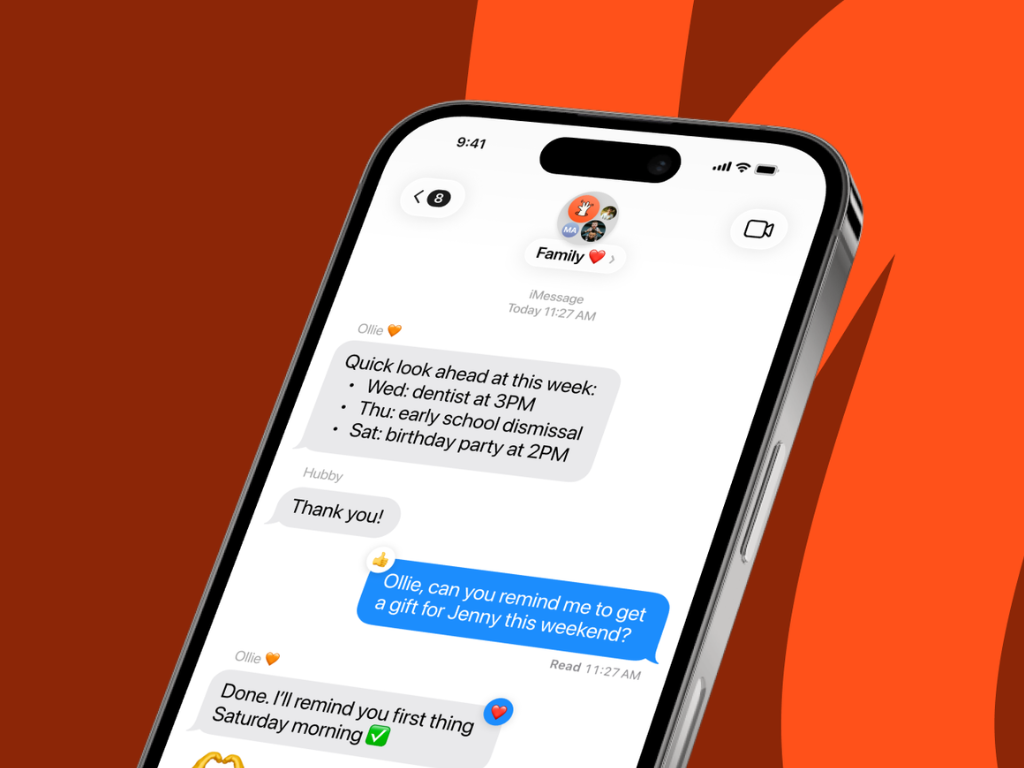
Instead of juggling multiple apps and reminders, Ollie becomes a family AI assistant you can simply text — one place where you can offload the mental work of family life and stay organized without thinking about it.
Below are answers to the most common questions about how Ollie works.
What is a family AI assistant?
A family AI assistant is a personal assistant powered by artificial intelligence that helps manage the day-to-day coordination of family life.
Instead of manually keeping track of everything yourself, you can text Ollie and ask it to:
- Coordinate schedules
- Remind family members about important events
- Help plan meals and groceries
- Keep shared lists updated
- Track goals or health habits
- Find answers or recommendations quickly
- Keep everyone in the loop about what’s happening
Think of Ollie as a central brain for your household — one place where your family’s information, plans, and reminders live.
Because Ollie communicates through text messages, it fits naturally into your daily life. There’s no new app to learn and no complicated system to maintain.
You simply text Ollie the same way you would text a person.
How is a family AI assistant different from a human assistant?
A human assistant can be incredibly helpful — but they are expensive, limited in availability, and usually focused on professional tasks.
Ollie is designed specifically for family life, and it works very differently.
Ollie is available anytime.
You can text Ollie at 6:30 AM while packing lunches or at 10:00 PM when you suddenly remember something you forgot.
Ollie remembers everything for you.
Once you tell Ollie something — a family schedule, a food preference, a reminder — it can keep track of it and help you act on it later.
Ollie coordinates across your family.
Instead of sending multiple texts or reminders, Ollie can help keep everyone aligned.
Ollie reduces the mental load.
The biggest difference isn’t just automation — it’s the ability to offload the thinking that normally lives in your head.
Ollie is like having a personal assistant whose entire job is helping your family run smoothly.
How much does Ollie cost?
Ollie costs $40 per month.
That includes your personal family AI assistant, onboarding support, and ongoing improvements as Ollie learns how your family operates.
To make it easy to try, Ollie comes with a simple guarantee:
If you’re not satisfied, you’ll receive a full refund.
How do I get started?
Getting started with Ollie is simple.
Because Ollie is still being rolled out carefully, new families begin with a personal onboarding session.
Step 1: Request an invitation
Submit a request to join and we’ll send you an invitation.
Step 2: Schedule your launch call
You’ll book a short personal setup call with the Ollie team.
Step 3: Build your family’s assistant
During the call we’ll help connect your calendar, explain how to use Ollie, and set up the workflows that matter most to your family.
When the call ends, you’ll already be able to start texting Ollie — and your assistant will begin helping immediately.
The goal is simple:
You leave the call with a working assistant that starts taking the mental load off your plate.
What kind of permissions do I need?
To get started with Ollie, you’ll need to grant permissions for the services you want Ollie to help with:
iMessage / SMS: No additional permissions needed on your end — Ollie communicates with you directly through iMessage or SMS. Simply text the number provided during onboarding.
Google Calendar: When you connect your calendar, you’ll be redirected to Google’s OAuth consent screen. You’ll grant Ollie read and write access to your Google Calendar so it can view your schedule, create events, find free time slots, and send you briefings about upcoming events.
Gmail: Similarly, connecting Gmail requires Google OAuth authorization. This allows Ollie to read, search, label, and draft emails on your behalf — enabling features like email triage, summaries, and alerts.
No permissions are required for features like meal planning, grocery lists, local search (Yelp), web search, health tracking, or reminders — these work out of the box.
You can connect or disconnect Google Calendar and Gmail at any time. Ollie will only access the services you’ve explicitly authorized.
How secure is this?
Ollie is built with multiple layers of security:
App Authentication: All API access is secured with Auth0 JWT tokens (RS256 signed, verified against JWKS). Sensitive endpoints require valid authentication before any data is accessed.
Third-party integrations: Connections to Google Calendar and Gmail are managed using industry-standard OAuth 2.0 flows — Ollie never sees or stores your Google password. You authorize access directly with Google.
Webhook verification: All incoming webhook messages are validated using HMAC-SHA256 signature verification with timing-safe comparison to prevent tampering and replay attacks.
Messaging: iMessage and SMS communication is handled through a secure messaging integration layer with API key authentication and idempotent message delivery.
Infrastructure: The backend runs on managed cloud infrastructure following industrial standard security practices.
Is my data private?
Yes, your data is private.
Your conversations, meal plans, calendar details, email summaries, health data, and other personal information are stored in a dedicated, secure database and are only used to provide Ollie’s services to you.
Ollie maintains conversation history to give you a coherent, personalized experience — but this data is tied to your account and is not shared with other users.
When Ollie accesses third-party services (Google Calendar, Gmail, etc.), it does so using your authorized credentials and only retrieves the information needed to fulfill your request.
Family features (group chats, shared lists) only share data with family members you’ve explicitly added.
Is my data used to train LLMs?
No, your data is private and not used to train any LLM.
Ollie uses models from Anthropic, Google, and OpenAI through their commercial APIs. Here’s what that means for your data:
Anthropic (Claude): Anthropic’s commercial API terms state that they do not use API inputs or outputs to train their models.
Google (Gemini via Vertex AI): Ollie accesses Gemini models through Google Cloud Vertex AI, which operates under Google Cloud’s enterprise data processing terms. Google does not use Vertex AI customer data to train foundation models.
OpenAI: When accessed through commercial API endpoints, OpenAI’s data usage policy states that API data is not used for model training.
Your messages and personal data are sent to these providers only for real-time processing (generating responses, understanding requests) and are not retained by the model providers for training purposes. Each provider’s enterprise/API terms explicitly separate API usage from model training data.
Is this related to the Ollie meal planning app?
Yes. Ollie originally began as a meal planning assistant for busy families, helping people plan dinners, organize grocery lists, and take the daily stress out of figuring out what to cook.
That meal planning app is still available today, and you can continue to download and use it if you primarily want help with planning meals and groceries.
Over time, many families wanted Ollie to help with more than just meals. They requested help with remembering things, coordinating schedules, managing reminders, and keeping their family organized.
That led to the creation of the full Ollie family AI assistant.
Today, you have two ways to use Ollie:
- The Ollie meal planning app, focused on planning meals and managing groceries
- The Ollie AI assistant, which can help with meals and many other parts of family life — all through simple text messages
Meal planning remains one of Ollie’s most loved features, and you can access those capabilities both in the meal planning app and through the Ollie assistant.
Do I need to download an app?
No — the Ollie assistant works directly through text messages.
You can communicate with Ollie using iMessage or SMS, just like texting another person. This makes it easy to use Ollie throughout your day without opening a separate app.
However, if you’re primarily interested in meal planning, you can also download the Ollie meal planning app, which focuses specifically on meal plans and grocery lists.
Many families use both, depending on how they prefer to interact with Ollie.
Can my whole family use Ollie?
Yes. Ollie is designed to support family communication and coordination.
You can include family members in group conversations with Ollie so everyone stays informed about schedules, reminders, lists, and plans.
Ollie can help keep everyone in the loop without requiring one person to manage everything.
Will Ollie replace all the apps I use?
Not necessarily — but it can make many of them easier to manage.
Instead of opening multiple apps to check your calendar, remember something, or organize a list, you can simply text Ollie and ask for help.
Ollie can connect with tools like Google Calendar and Gmail while also handling things like meal planning, reminders, and shared lists.
For many families, Ollie becomes a central place to manage the information and tasks that would otherwise live across many apps.
Still have questions?
If you’re curious whether Ollie could help your family, the best way to understand it is simply to try it.
Request an invitation and we’ll help you set up your personal family AI assistant.